This week we had a mini hackathon comparing Large Language Models for document transcription. It was enlightening for many in the group who have never used an LLM before, and for those that have, but not for this purpose.
Most of us had recently watched Sara and Ben Brumfield’s “Introducing Gemini 3 Support in FromThePage,” where they reference Mark Humphrey’s analysis of Gemini 3 for document transcription.
To test, we gathered some “problematic” documents (actually pretty ordinary run-of-the-mill documents, but ones computers have trouble with). Below I show results using a planting form from our Prairie States Forestry Project. (Note that this document is not up on the site yet, but will be early next year). I tried out CoPilot (part of our Microsoft 365 package at UNL) Claude.ai, and Gemini 3 (the free access version, so I could only do two pages).
For all models I gave the simplest instruction I could: “Transcribe this”
The form
Planting Directions
The form starts with a place for a code and a name. Easy enough, right?
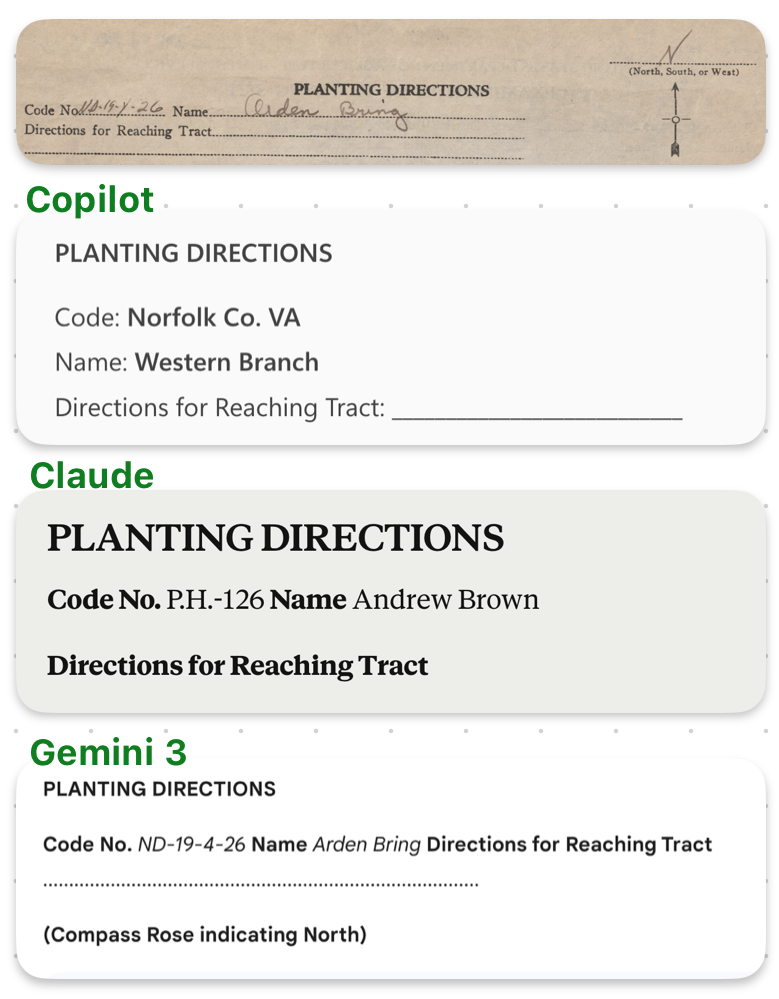
Copilot completely makes up a code of “Norfolk Co, VA” and a name of “Western Branch”. Claude gets a bit closer with the code number and name, but only Gemini 3 gets it right. Gemini 3 is also the only model to mention the compass rose at the top.
The hallucinating of copilot is especially concerning here, making it useless for this type of work.
Chart
The next part of the form is a planting chart, with a little twist – they split up the first line half and half.
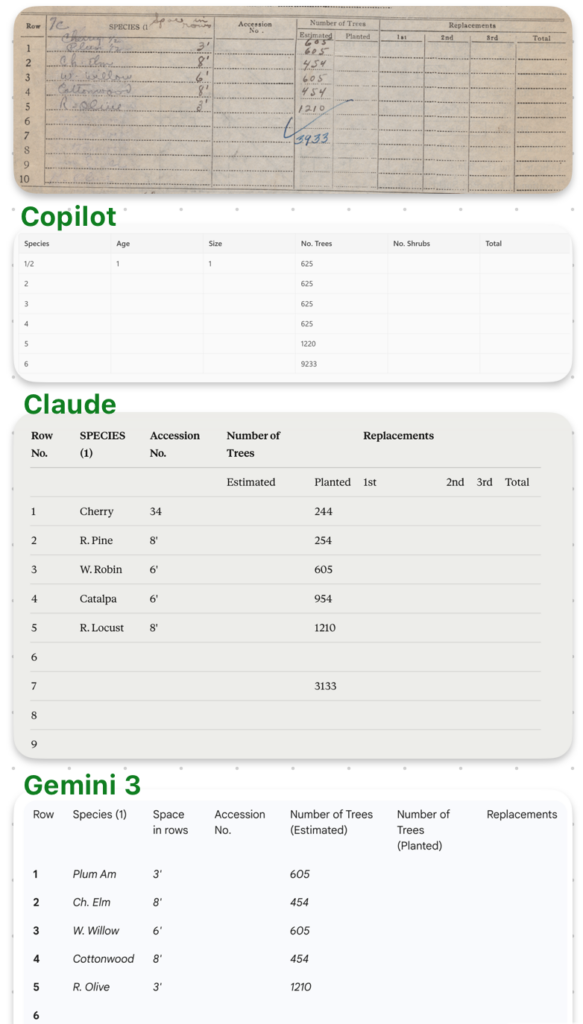
Copilot completely mangled the form, adding columns that don’t exist (age, size), omitting the (hand written) trees themselves (the most important part!), and even getting the numbers all wrong. Claude does marginally better on the numbers (though it puts them in the wrong column), still manages to get them wrong, but does the best at representing the rest of the form even though it’s not filled out. Gemini 3 is mostly correct, though it missed that there are two trees in the first line of the chart (they split the planting half and half) and there should be an additional “605”.
Gemini 3 is also the only model that caught the extra, handwritten column “space in rows” – the other models either ignored that data or put it in the wrong column. Gemini 3 also didn’t transcribe all the columns that had no data.
Planting Data
The planting data part of the form has the name Percy Trieglaff and a date.
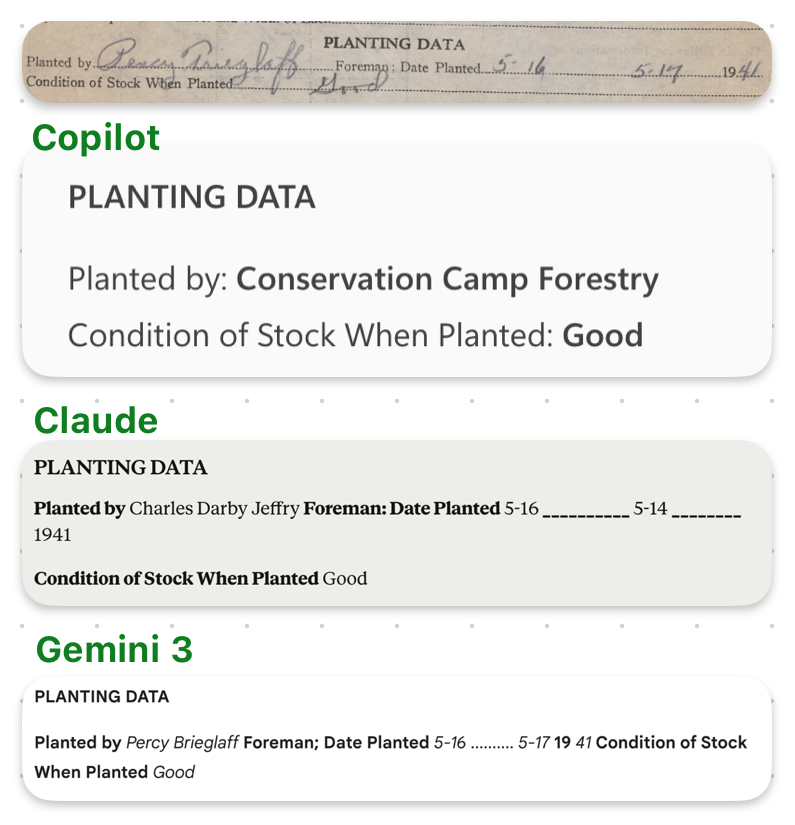
Copilot omitted the date altogether, Claude got the date wrong.
The funniest part was the names. “Percy Trieglaff” became “Conservation Camp Forestry” in Copilot, “Charles Darby Jeffry” in Claude, and “Percy Brieglaff” in Gemini 3 (which might be correct for all I know, I can’t read handwriting well).
Planting Remarks
Finally, some planting remarks.
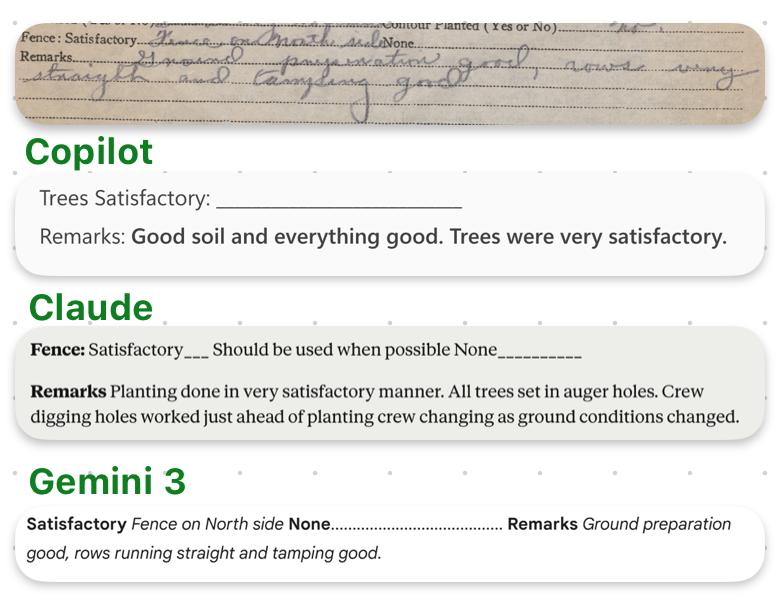
Gemini 3 appeared to get the handwritten text correct, “Ground preparation good, rows running straight and tamping good.” Copilot hallucinated “Good soil and everything good. Trees were very satisfactory.” Claude came up with “Planting done in a very satisfactory manner. All trees set in auger holes. Crew digging holes worked just ahead of planting crew changing as ground conditions changed.” (WHAT)
Reflection
The constant hallucination of Copilot and Claude have been my norm whenever I try to dip into LLMs. There has always been so much of it that it seemed like it was too potentially data polluting to use for any kind of transcription. The Gemini 3 output was likely better than I could produce given the same task, other than the fact that I could catch the weirdness with the first line of the table (this is why we need human checkers!). We have also been working with Google’s Document AI. My colleague Brian Pytlik Zillig showed a demo of what he is working on using Document AI to transcribe documents, and it seemed very close to perfect.
I am excited about these results, because as much as I wish we could hire people to transcribe everything, there are hundreds of thousands of pages of materials that have descriptions but no transcriptions at this point, and very little money (our budget has been cut pretty much every year for the last decade or so). If we can use a tool like this (which costs cents per page), combined with quality control by experts, we can get more materials up and usable by folks.
(Thanks to Laura Weakly for editing help!)